
Hello Weather
Electric Dream MachineWeather
3.2333.00 Reviews
- Version
- 3.10.10
- Installs
- 100.00K
- Age Rating
- Everyone
Screenshots
Our Review of Hello Weather
 Analysis by Appyee
Ever been caught in the rain without an umbrella or overdressed during a surprise heatwave? Yeah, me too. That's why I decided to give Hello Weather a try. It's an app that promises to keep you updated on all things weather-related without overwhelming you with too much data. But does it deliver? Let's dive in and find out!
First Impressions: Clean and Friendly Interface
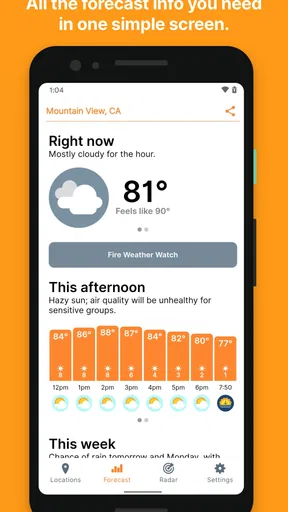
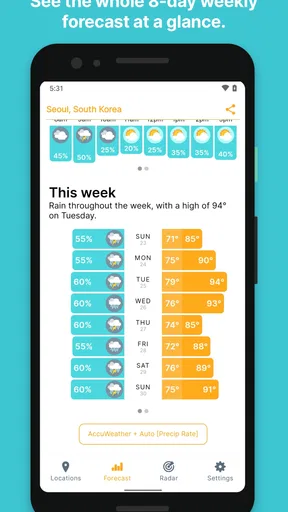
Upon opening Hello Weather, the first thing that strikes you is its clean, uncluttered interface. It's like a breath of fresh air compared to some of the other weather apps out there that bombard you with charts and graphs. The layout is straightforward, with the current weather front and center. You get the temperature, weather conditions, and a fun little icon that depicts the current situation.
The app uses bright colors and bold fonts, making it easy on the eyes. Navigation is a breeze, and everything is pretty intuitive. You won't find yourself scratching your head trying to figure out where to find something. For someone like me, who wants quick and reliable weather updates without the fuss, this setup is ideal.
Features: What’s in the Weather Toolbox?
So, what exactly can you do with Hello Weather? Well, it packs quite a punch with its features:
- Hourly Forecasts: Want to know if that drizzle will clear up by the time you leave work? Hello Weather has you covered with detailed hourly forecasts.
- Weekly Outlook: Planning a weekend getaway? Check out the app’s weekly forecast to ensure perfect timing for your plans.
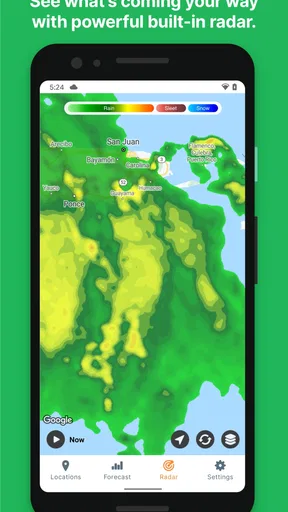
- Radar Maps: For those who like to see the bigger picture, the radar maps provide an overview of weather patterns in your area.
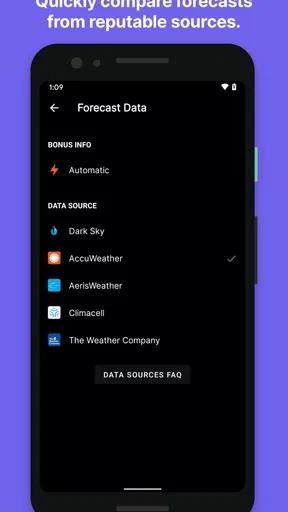
- Multiple Data Sources: The app pulls data from several sources, including Dark Sky and Weather Underground, to give you the most accurate forecast possible.
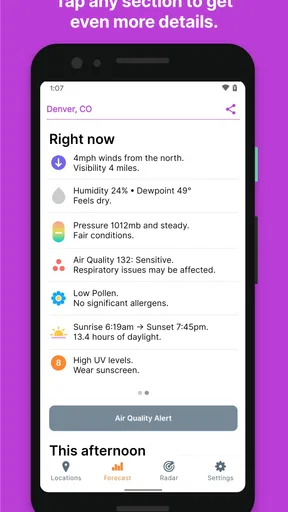
One feature that I found particularly charming is the way Hello Weather presents the UV index and wind speed. It’s not just numbers; it feels like the app is having a friendly chat with you, keeping you informed but also entertained.
Customization: Make it Your Own
Not everyone uses weather apps the same way, and Hello Weather recognizes that. You can customize what you see on the main screen, ensuring that the most relevant information is always at your fingertips. Whether you want to see the dew point or prefer to keep it simple with just the temperature and conditions, the choice is yours.
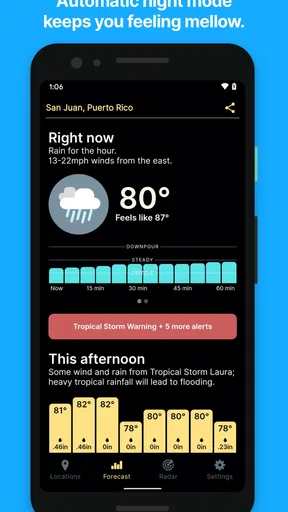
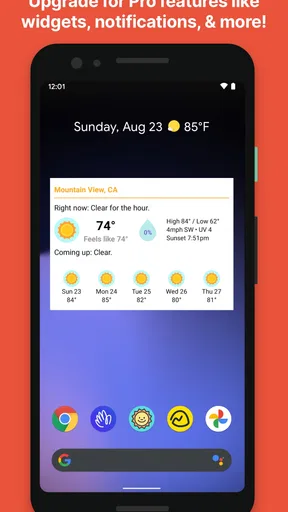
There's also a handy option to switch between dark and light modes, which is a nice touch for those who are particular about their app aesthetics. Plus, if you’re someone who likes a widget on your home screen, Hello Weather offers those too!
Performance: Fast and Reliable
One of the things that can make or break an app is its performance, and I’m happy to report that Hello Weather doesn’t disappoint. It's fast, responsive, and doesn’t drain your battery like some other apps. Whether you’re on Wi-Fi or mobile data, the updates are swift, ensuring you’re always in the know.
Even when I was traveling, the app quickly adjusted to my new location, providing accurate forecasts without missing a beat. That’s a big win in my book!
Final Thoughts: Is Hello Weather Worth Your Time?
So, would I recommend Hello Weather? Absolutely. It’s a delightful app that makes checking the weather a pleasant experience rather than a chore. With its user-friendly interface, customizable features, and reliable performance, it’s hard to find anything to complain about.
Whether you’re a weather enthusiast or someone who just wants to know if you need a jacket tomorrow, Hello Weather has got you covered. Give it a whirl, and you might just find it becomes your go-to weather buddy. Trust me, once you try it, you’ll wonder how you ever did without it!
Verdict
Strengths of Hello Weather
- User-friendly interface with intuitive navigation.
- Accurate weather forecasts with real-time updates.
- Customizable alerts for severe weather conditions.
- Minimalistic design enhances readability.
- Syncs seamlessly across multiple devices.
Limitations of Hello Weather
- Limited free features; premium options needed.
- Occasional lag in loading weather data.
- No offline mode for viewing saved forecasts.
- Widget customization options are limited.
- Ads can be intrusive in the free version.
Similar Picks in This Category
View All
Weather - By Xiaomi
Xiaomi Inc.4.1

Weather & Radar Forecast
WetterOnline4.8

Weather
OneLouder Apps4.6

AccuWeather: Weather Radar
AccuWeather3.6

The Weather Channel - Radar
The Weather Channel4.6

1Weather Forecasts & Radar
OneLouder Apps4.3
Frequently Asked Questions
What makes Hello Weather different from other weather apps?
Hello Weather stands out due to its user-friendly interface and simplicity. It provides all essential weather details without overwhelming you with information. Users appreciate its clean design, which makes navigation intuitive. Additionally, the app integrates data from multiple reliable sources, ensuring accurate and up-to-date forecasts.
Does Hello Weather offer any premium features?
Yes, Hello Weather includes premium features that enhance the user experience. For a small subscription fee, users can access detailed radar maps, advanced notifications, and customizable widgets. These features are designed to provide more comprehensive weather insights and improve planning for outdoor activities.
Is Hello Weather compatible with all devices?
Hello Weather is available for both Android and iOS devices, ensuring broad compatibility. It requires a modern operating system version to function optimally. Users should check the app's specific requirements on the Google Play Store or Apple App Store to ensure their device is compatible before downloading.
How accurate are the forecasts provided by Hello Weather?
Hello Weather prides itself on accuracy, using data from reputable sources like Dark Sky and Weather Underground. This multi-source approach enhances forecast reliability. The app updates frequently to reflect real-time changes, giving users confidence in planning their activities based on current conditions.
Can I customize the notifications in Hello Weather?
Absolutely, Hello Weather offers customizable notification settings. Users can choose what type of alerts they receive, such as severe weather warnings or daily forecasts. This flexibility ensures that you only get the information that’s relevant to you, minimizing unnecessary interruptions.
